Social media and chat platforms have evolved into online transaction gateways, quietly and steadily, and WhatsApp is no exception. In India alone, more than 50 million SMBs use WhatsApp Business to engage customers and drive sales. The popular messaging platform competes with older digital transaction modes.
For brands embracing conversational commerce, it is hard to choose between the WhatsApp Business App vs WhatsApp Business API. Both options offer certain advantages and limitations. The confusion is:
- Should they use the free WhatsApp Business App and manage chats manually?
- Or, should they invest in the WhatsApp Business API to obtain benefits like WhatsApp automation, CRM integration, and scaled sales workflows?
You must look beyond the features. Focus on how your target customers want to buy. They prefer a smoother sales funnel, quick replies, and personalized support. In 2026, using WhatsApp for business is no longer optional — it is a strategic necessity. Picking the right variant for your business can fuel its growth and vice versa.
For planning and utilizing WhatsApp business API for marketing, you need a veteran, reliable ally. Choose BrandLoom for exceptional, precise guidance and customized conversational commerce services. Our experts help transform WhatsApp into a measurable revenue engine through strategy, automation, and digital marketing integration.
In this blog, we will explain the marketing buzz around WhatsApp Business API marketing and clarify the key differences between the Business API and the app. We will also show you the right ways to choose for your business needs, and discuss future prospects.
WhatsApp Business App vs WhatsApp Business API – Core Differences
Let’s get straight into WhatsApp Business App vs WhatsApp Business API.
1. The WhatsApp Business App is an entry-level version of WhatsApp. It is aimed at small brands and lets you engage with customers directly from mobile devices. You get basic business features, including simple automated greetings, a business profile, a product catalog, quick replies, labels, etc. It is a manual chat tool.
It suits local stores handling limited queries and small brands with basic customer care needs. The drawback is that you do not get advanced features like WhatsApp CRM integration. Team support is limited as well.
2. The WhatsApp Business API or the WhatsApp Business Platform is an enterprise-level version made for bigger brands with scalable sales needs. You don’t get it like a standalone app. It integrates into business systems like e-commerce platforms and CRM through approved service partners.
Here’s a look at the major differences:
1. Voice Calls
WhatsApp Business App supports voice calling, but lacks automation and routing for such calls. That makes managing growing call volumes tough. WhatsApp Business API mostly focuses on scalable messaging automation and customer handling. Voice call functionality depends on provider capabilities and may lack wide availability.
2. Ticket Management
The business app has no embedded ticket management system, making conversation management difficult. The API comes with integrated ticket management with third-party tools for structured customer service workflows and better query resolution.
3. Scalability with Several Channels
The business app is mostly meant for WhatsApp-based communications. The Business API supports seamless integration with other platforms like email, live chat, and CRM apps. This is ideal for developing a seamless customer experience across channels.
4. Security & Privacy Features
The Business app supports basic end-to-end encryption. But the WhatsApp Business API adds advanced security features and compliance options. It is better for dealing with sensitive customer data.
Let’s have a closer look at the comparison:
| Features | WhatsApp Business App | WhatsApp Business API |
|---|---|---|
| Best for | Small businesses | Growing & enterprise businesses |
| Automation | Basic | Advanced |
| CRM integration | No | Yes |
| Multi-agent support | Limited | Full |
| Scalability | Low | High |
| Cost | Free | Paid |
So, the WhatsApp Business App helps small businesses manage customers manually. The WhatsApp business API brings automation, integration, and reporting to drive, track, and scale sales. This strategic difference directly impacts your sales workflow, buyer journey, and revenue scalability.
How the Features Impact Sales?
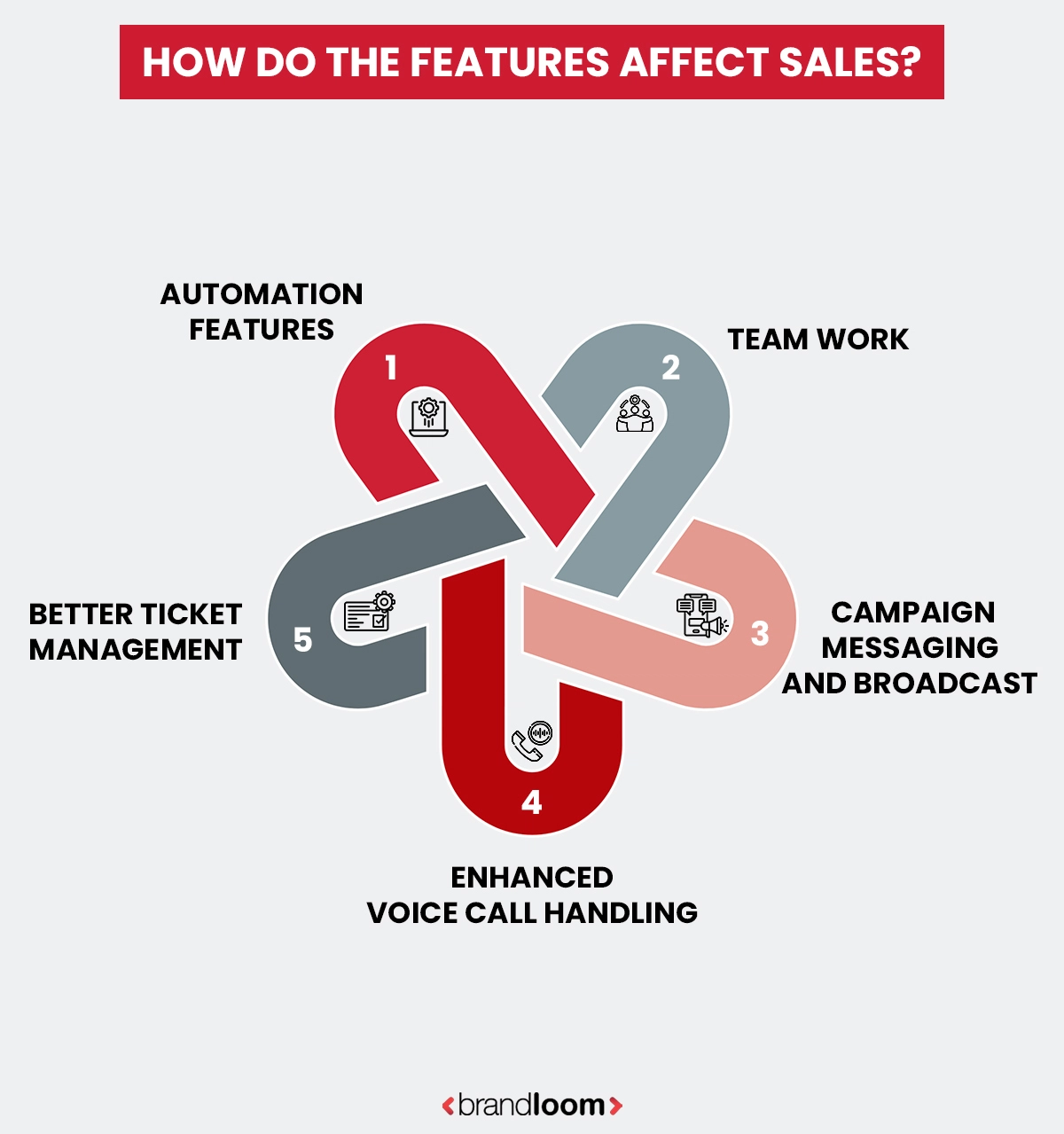
When comparing the WhatsApp Business App vs WhatsApp Business API, analyze the features carefully as those impact the revenue generation.
Here, we will see how the core features in these versions of WhatsApp business apps affect your revenue:
1. Automation Capability
The automation features of WhatsApp business app are limited. You get greeting messages and quick replies. The Business API adds chatbots, automated lead qualification, abandoned cart reminders, and structured workflows. These automations help lower response time and increase conversion probability.
2. Teamwork
The business app supports only 5 linked devices. It lacks structured agent assignment. With the WhatsApp Business API, you get multi-agent dashboards with routing, tagging, and performance tracking through sales automation tools.
3. Broadcast & Campaign Messaging
The business app offers Broadcast lists with contact limitations, and execution is manual. The WhatsApp business API brings pre-approved template messaging for marketing, utility, and authentication categories. With a strong API, you can plan for structured outbound sales campaigns.
4. Voice Call Management
The WhatsApp Business API enhances structured communication workflows through automation, routing, and CRM-based messaging. So, businesses connect with customers directly, and calls are routed to the right agents. Call integration with the CRM tool gets easier. This lowers response time and boosts conversion rates.
5. Ticket Management
As sales teams scale, ticket management becomes crucial. The WhatsApp Business API offers integrated ticketing systems, allowing brands to prioritize and follow up on customer queries. This helps them tackle lost leads and delayed responses.
To make the most use of WhatsApp business API for marketing, you need the expertise and assistance of veteran digital marketing agencies. Choose BrandLoom to get access to decade-long expertise in e-commerce and digital marketing niches.
What are the Limitations of the WhatsApp Business App for Sales?
For small businesses, the WhatsApp Business App works well initially when the customer base is small and there are not many employees. But with business growth, its limitations become clearer. As inquiry volume goes up, you can spot operational friction and lost revenue.
- High Inbound Volume – When your brand’s daily inquiries cross 50–100 messages, replying manually slows down. There is no structured routing or prioritization logic in the app.
- Multi-Agent Confusion – The app supports up to five linked devices, but you get no centralized dashboards, performance visibility, or conversation assignment. There is no structured team collaboration mechanism.
- Limited Analytics – The Business App offers message statistics, but there is no agent performance reporting, conversion tracking, or funnel attribution.
- No Structured Follow-Ups – The app does not support behavior-based triggers or structured follow-ups.
- Paid Ads Bottleneck – Click-to-WhatsApp ads generate high conversion volumes. But without routing and automation, handling ads becomes difficult.
The bottom line is that the WhatsApp Business App is meant for conversation management, not exactly for structured, scalable sales operations.
How WhatsApp Business API Contributes to Scalable Sales Systems?
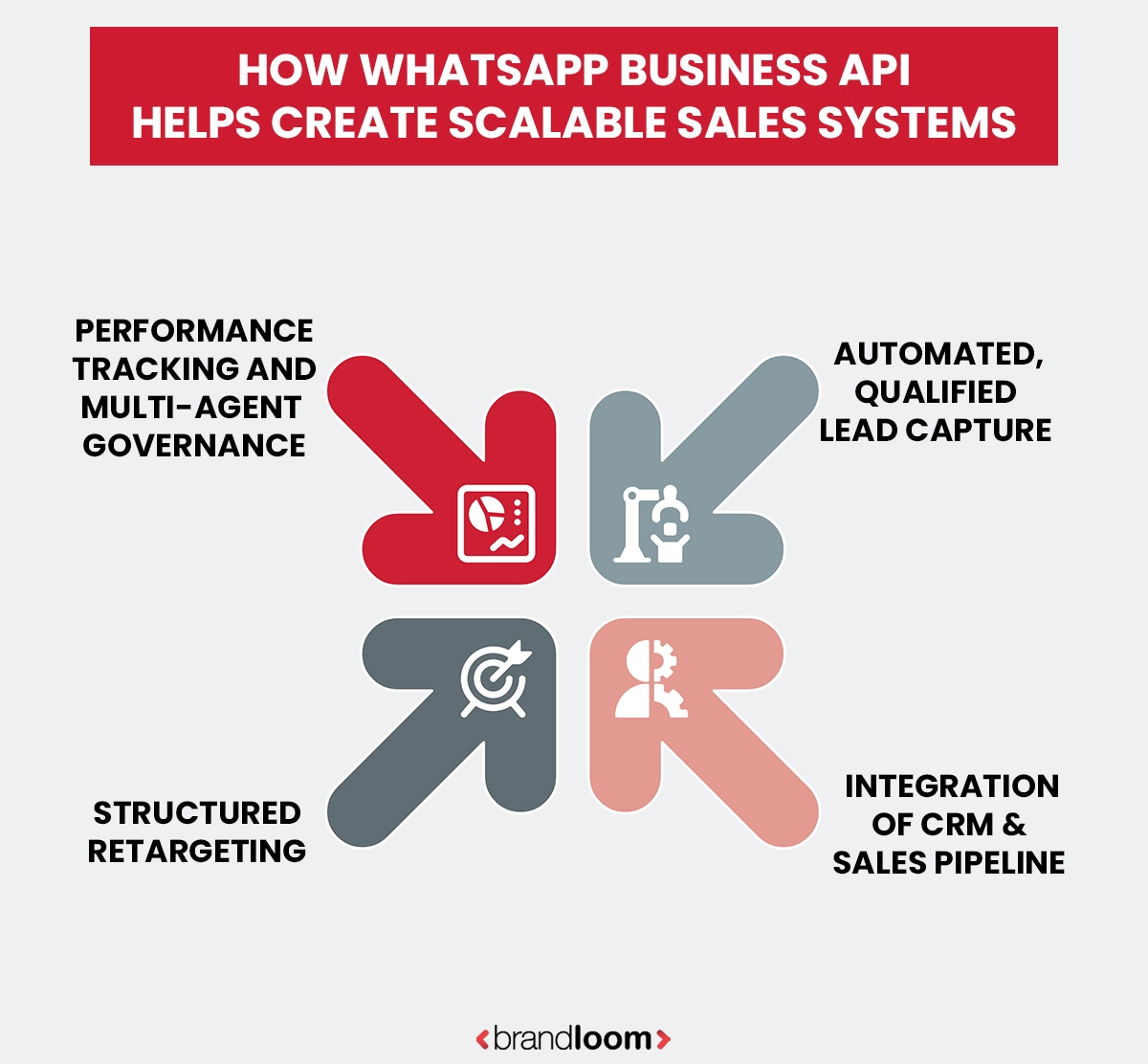
With the WhatsApp business app, you can reach out to customers, while the WhatsApp Business API lets you design and automate their shopping journey. The API lets brands connect with CRM systems, marketing automation tools, helpdesks, and e-commerce platforms. Such integration transforms a digital chat tool into a structured revenue channel.
1. Automated Lead Capture & Qualification
When a customer clicks a Click-to-WhatsApp ad or sends a message to your brand, the API can trigger automated workflows. A chatbot is useful for asking qualifying questions and, based on the answers, tagging leads and routing them to the appropriate sales representative. Then, high-intent buyers get priority response. So, your sales teams can focus on serious prospects, and manual screening time goes down.
2. CRM & Sales Pipeline Integration
With API integration in place, Conversations sync directly to your CRM tool, and teams can access customer history anytime. The leads then move through defined sales stages, and the system can generate Follow-up reminders.
3. Structured Outbound Messaging & Retargeting
With pre-approved message templates, brands can send a payment link. They can send appointment confirmations and send abandoned cart reminders.
4. Multi-Agent Governance & Performance Tracking
API-based dashboards support SLA monitoring, the logic behind agent assignment, conversion reporting, and response time tracking. This paves the way to accountability and measurable performance.
So, the WhatsApp Business API not only enhances your brand message volume. It brings structure, automation, and data visibility, too. These serve as pillars of scalable sales operations.
To master WhatsApp business API marketing and integrate it for business growth, you need expert assistance. Count on BrandLoom, the award-winning digital marketing agency with a stellar track record in e-commerce and allied services.
The 2026 Reality — Conversation Windows, Templates & Cost Model
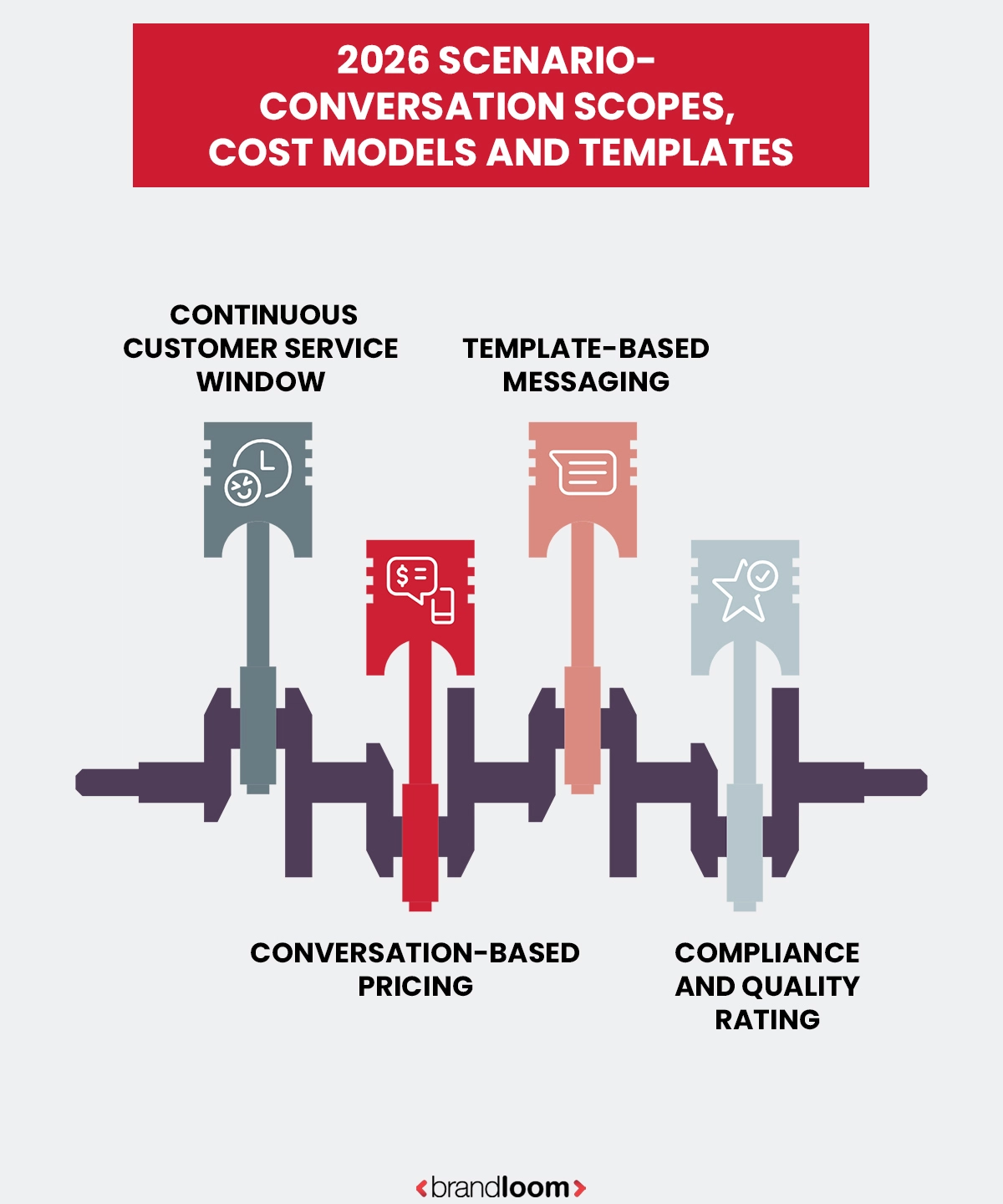
What’s the big misconception about the WhatsApp Business App vs WhatsApp Business API? Several brand owners equate API with unlimited marketing freedom. But WhatsApp operates under a structured conversation and pricing framework. You must grasp this before using the WhatsApp business API service.
1. A 24-Hour Customer Service Window
A message from a customer has a 24-hour service window. Within that timeframe, you can respond freely. After that, you must use an approved message template.
2. Conversation-Based Pricing Model
WhatsApp Business API pricing is based on conversation categories rather than individual messages. Pricing changes depending on whether the conversation is marketing, utility, or authentication-based.These charges vary based on factors like authentication conversations, utility conversations, and marketing conversations. The pricing will vary across countries.
3. Template Messaging & Approval
For any kind of outbound communication like promotions, reminders, or re-engagement, businesses need to offer message templates for approval. There are templates for Authentication, utility, and marketing. Each of these follows specific compliance norms.
4. Quality Rating & Compliance
WhatsApp monitors things like Message engagement, block rates, and user feedback. Low-quality messaging can lead to restrictions or reduced messaging limits.
So, WhatsApp business API is powerful — but it is governed. To scale your brand sales on the platform, you must focus on factors like:
- Compliance awareness
- Template planning
- Cost forecasting
- Funnel design
Without a solid and well-designed WhatsApp business API marketing strategy, your brand can’t leverage the full benefits. That is where BrandLoom steps in. Our E-commerce experts and digital marketing analysts can design and implement the perfect WhatsApp campaigns to bring your business unmatched, sustained growth.
When Should You Upgrade? A Strategic Decision Framework for WhatsApp API Upgrade By BrandLoom
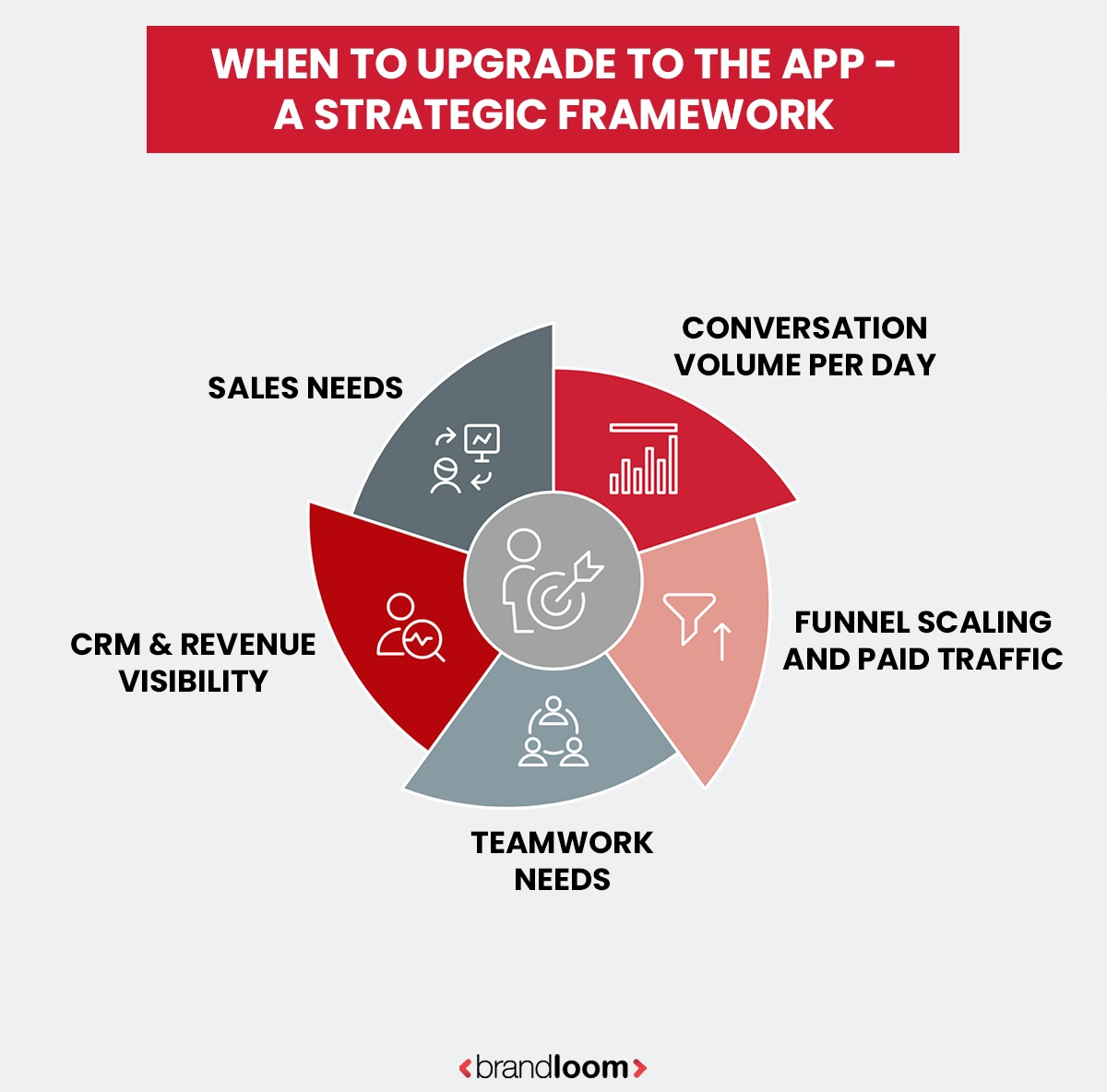
The commonplace mistake brands make when choosing between WhatsApp Business App vs WhatsApp Business API is waiting too long.
Several brands learn their lessons the hard way- with declining conversion rates, missed leads, delayed responses, etc.
Here, we bring you a proactive framework to choose the right time to switch to WhatsApp API for sales:
1. Daily Conversation Volume
Does your sales team handle fewer than 30–50 meaningful sales conversations a day? Then you can stick to the WhatsApp business app. However, after crossing 100 daily inquiries — especially during campaigns, manual handling slows response times. High inbound traffic needs proper routing logic and automation.
2. Paid Traffic & Funnel Scaling
Click-to-WhatsApp ads lead to large volumes of conversations. Then you will need features like automated lead qualification and routing. Without these, your agents will certainly get overwhelmed. The API helps structure intake workflows.
3. Team Collaboration Requirements
The Business App supports linking up to five devices. However, you miss advanced features like structured agent assignment or performance visibility. With time, the number of sales agents goes up, and you will need dashboard-based management via the WhatsApp business API for marketing.
4. CRM & Revenue Visibility Needs
If you want to integrate WhatsApp-based sales with your CRM, the API is a must. You get better insights into the revenue cycle. Manual chat logs are no match for structured data systems.
5. Sales growth
Initially, you can use the app when it serves as an extra sales channel. But when it becomes a major source of leads and conversions, you must focus on automation and system integration. That is when you need the WhatsApp business API service.
When growth starts overloading your manual processes, make the switch to the API. For effective WhatsApp business API integration with CRM, you need specialized consultation and assistance.
Is WhatsApp Business API Worth the Price- Cost vs ROI
In the debate around WhatsApp Business App vs WhatsApp Business API, the prime concern is the investment. You get the WhatsApp Business App for free. The WhatsApp business API for marketing operates on a paid, conversation-based pricing model. Most brands choose an official solution provider.
Initially, the app appears more economical. But you need to look at it from cost versus revenue capacity.
How does WhatsApp API Pricing Work?
The WhatsApp business API adheres to a conversation-focused billing structure. It is categorized into:
- Authentication conversations ( OTPs and verification messages)
- Utility conversations (transactional updates, or reminders)
- Marketing conversations (promotional outreach)
Pricing varies by country and category. You may have to pay provider charges for things like automation dashboards, customer data integrations, and support. This is needed for both structured operational costs and scalability.
The Hidden Cost of Sticking to Manual
There are hidden costs of using the WhatsApp business app. There is no direct platform fee, but you face revenue losses indirectly. Here’s how:
- Missed follow-ups on warm leads
- Delayed answers reduce chances of conversion
- No structured attribution tracking
- No performance visibility across agents
- No abandoned cart automation feature
The ROI Perspective
From an ROI perspective, the WhatsApp Business API pricing is justified. This is because automation, faster responses, and structured follow-ups help increase conversion rates.
- You get 24/7 automated lead capture
- Multi-agent efficiency
- CRM-backed reporting and forecasting
- Consistent follow-up sequences
So, the response times shrink and workflows become systematic, leading to enhanced conversions and revenue. Your Sales teams become more productive.
So, rather than focusing on the API costs, try to analyse if the limited features of WhatsApp business app are stalling your brand growth.
Conclusion
The comparison between the WhatsApp business app vs WhatsApp business API ultimately comes to how serious you are about scaling sales through conversation.
The WhatsApp Business App is a great starting point. It enables small brands to respond quickly, manage inquiries manually, and develop early customer relationships.
With growth, the needs change. The message volume increases, and sales teams expand, along with rising inbound traffic. Then you see the limitations of the app, including missed leads and lower sales.
That’s where the WhatsApp Business API becomes the savior. It brings structured automation, campaign scalability, customer data integration, and multi-agent collaboration features.
In 2026, WhatsApp is more than an additional support channel for brands. It is now a major sales touchpoint. Choosing between the App and the API is a strategic decision.
Choose BrandLoom, the agency with the experience of developing successful, robust e-commerce and digital marketing strategies for numerous clients in India and abroad. Let our experts plan the fitting WhatsApp business API marketing roadmap for your brand and put it on a sustained growth track.
FAQs
The major difference between WhatsApp Business API and the app is in scale and structure. You can use the app for free, and it suits small business needs. WhatsApp business app features include business profiles, quick replies, labels, and basic automated messaging. The Business API comes with an extensive feature set that bigger and growing brands gain from. You get robust automation features, sales data integration, and structured team collaboration. With it, you can achieve scalable WhatsApp conversation management across team members and get better data visibility. The WhatsApp business app pricing varies across regions and categories.
The better solution depends on your brand’s sales volume and operational complexity. If you have a small business handling limited inquiries, the features of WhatsApp Business app will suit you well. However, for fast-growing brands looking forward to revenue-driven growth, the Business API is perfect. It has useful features like automated messaging, structured routing, CRM sync, and real-time performance tracking – things you need when WhatsApp is a major digital sales channel.
Whether the Business API is better than the app depends on your brand’s workflow and growth stage. For small businesses dealing with a limited volume of inquiries, the free WhatsApp Business App suits fine. It works when a few team members manage the customer service manually.
However, when sales volume goes up, things change. The Business API offers structured team collaboration, scalable automated messaging, and CRM software sync. It supports advanced features like message templates, workflow automation, and performance tracking across multiple phone number users. With it, you can keep customers engaged at scale and turn your digital sales engine more predictable.
Yes, small businesses can use WhatsApp Business API according to their operational needs. The Business App is ideal for small business owners. However, growing brands can go for the API if they want structured automation, multi-agent access, and CRM software integration. It lets you handle high inbound inquiries, run WhatsApp ads, and manage automated messaging beyond quick replies. Your focus must be on volume and scalability — not company size alone.
WhatsApp automation improves your sales by reducing response time and ensuring no inquiry is missed. You can use quick replies and basic automated messaging to manage customer service better. To manage a larger conversation flow and experience structured automation, the Business API is a must. You get automated messaging flows, lead qualification bots, and pre-approved message templates. With such automation, your buyers stay engaged throughout their shopping journey. It facilitates better team collaboration. The faster replies and consistent follow-ups help enhance conversion rates.
The WhatsApp Business API operates on a conversation-based pricing model, unlike the free Business App. The former needs you to work with an official provider, in general. WhatsApp business app pricing will depend on conversation categories, usage volume, and the solution partner you pick. However, you must look beyond only the cost to use the service. You get advanced features like structured team collaboration, chatbot automation, message templates, and tight customer data syncing.
Yes, but for that, you must use the WhatsApp Business API, as the free Business app lacks this feature. The former integrates well with CRM platforms, helpdesks, and marketing automation tools. This way, you can centralize customer data and manage each WhatsApp conversation in a more structured manner. Enhanced real-time visibility leads to better follow-ups and performance tracking across team members. The Business App has limited automation features. For customer engagement across multiple touchpoints and better teamwork insights, WhatsApp business API integration with CRM is a must.
The WhatsApp Business App supports multiple users. You can use upto 5 linked devices for a phone number. This suits small businesses with limited customer service needs. However, in structured teamwork, it lags. There is no centralized dashboard to manage accountability. The Business API is made for larger teams, and comes with multi-agent dashboards, routing logic, customer messaging automation, and structured message templates. When inquiry volume increases, and coordination takes center stage, the API offers stronger collaboration capabilities.
The WhatsApp Business API is tailor-made for scalability. The API supports high message volumes, multiple team members, and structured automation. Through the WhatsApp business API for marketing, you can send messages using approved message templates, automate messaging workflows, and embed with CRM tools. Then you can keep customers engaged across big campaigns easily. Its scalability eases structured team collaboration. And several agents can manage the same phone number through centralized dashboards. There is no overlap or confusion, and you get the infrastructure to achieve brand growth without operational bottlenecks.
A business should consider upgrading when manual processes start stalling its growth and workflow. WhatsApp business app features are ideal for small business owners managing low inquiry volumes and using a few agents. However, once conversation volume increases, team collaboration complexity shoots up, too. Then, WhatsApp for business API integration comes to the forefront. Upgrading is a must when paid ads start bringing high inbound traffic. CRM tool integration takes center stage, and multiple members need access.